Building a Todo MCP Server - A Learning Journey into MCP Development
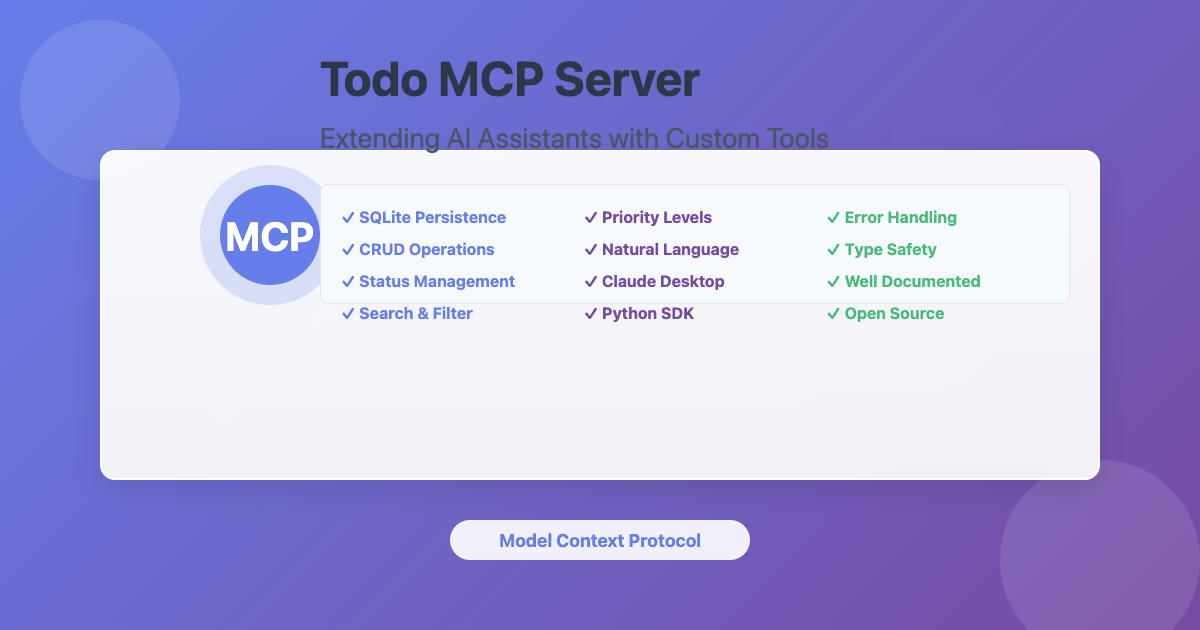
A hands-on learning project implementing a Model Context Protocol server with FastMCP, streamable-http transport, and dynamic tool discovery
Published on January 25, 2026 by Dai Tran
project mcp-server ai-powered-application learning blog
17 min READ
Introduction
This is a learning-focused project designed to gain hands-on experience developing a Model Context Protocol (MCP) server following modern best practices. The project implements a simple Todo API with two core operations (GET and POST), wrapped in a FastMCP server using streamable-http transport—the modern MCP standard that replaced Server-Sent Events (SSE).
The Model Context Protocol is an open standard developed by Anthropic that enables seamless integration between AI applications and external data sources. By building this MCP server, you’ll learn how AI assistants like Claude Desktop, Roo Code, and GitHub Copilot can access and manipulate real-world data through well-defined tools and resources.
Learning Objectives
This project teaches you how to:
- Understand FastMCP Framework Architecture - Learn how FastMCP simplifies MCP server development with automatic tool registration and context management
- Implement Streamable-HTTP Transport - Use the modern MCP transport standard that provides better reliability through a single endpoint
- Follow Modern Development Patterns - Apply best practices for project structure, logging, error handling, and documentation
- Practice Dynamic Tool Discovery - Implement automatic tool registration using Python module introspection
- Learn MCP Server Deployment - Configure and deploy MCP servers for use with various AI clients
- Build Production-Ready APIs - Create RESTful APIs with FastAPI, including validation, error handling, and documentation
Why This Matters
MCP servers act as bridges between AI assistants and external systems, extending AI capabilities beyond their base knowledge. This project provides a practical foundation for building MCP servers that connect AI to databases, APIs, file systems, and other data sources—enabling more powerful and useful AI-powered workflows.
What is Model Context Protocol (MCP)?
The Model Context Protocol (MCP) is an open protocol developed by Anthropic that standardizes how AI applications communicate with external systems and data sources. MCP enables:
- Standardized Integration: A common protocol for connecting AI assistants to various data sources and tools
- Tool Exposure: Servers can expose functions (tools) that AI assistants can invoke
- Resource Sharing: Servers can provide access to data resources like files, databases, or APIs
- Bidirectional Communication: AI assistants can both query data and perform actions through MCP servers
MCP servers act as bridges between AI assistants and external systems, extending the capabilities of AI beyond their base knowledge and enabling them to interact with real-world data and services.
High Level Architecture and Design

The Todo MCP server implements a layered architecture with three main components:
System Architecture
┌─────────────────┐
│   AI Client     │  ← Roo Code / Claude Desktop
│   (VS Code)     │
└────────┬────────┘
         │ HTTP (streamable-http)
         ▼
┌─────────────────┐
│  MCP Server     │  ← Port 8080
│  (FastMCP)      │     Exposes MCP tools
└────────┬────────┘
         │ HTTP REST API
         ▼
┌─────────────────┐
│  Backend API    │  ← Port 8000
│  (FastAPI)      │     Business logic & storage
└─────────────────┘
Component Breakdown
1. Backend API (Port 8000)
- Technology: FastAPI REST service
- Storage: In-memory todo storage (can be extended to SQLite/PostgreSQL)
- Endpoints:
GET /api/todos- List todos with filteringPOST /api/todos- Create new todoGET /health- Health check
- Code: API implementation
2. MCP Server (Port 8080)
- Technology: FastMCP with streamable-http transport
- Tools Exposed:
get_todos- Retrieve todos with optional filteringcreate_todo- Create new todo items
- Communication: HTTP REST API calls to Backend API
- Code: MCP server implementation
3. AI Client Integration
- Roo Code (VS Code extension) or Claude Desktop
- Connects to MCP Server via streamable-http protocol
- Uses natural language to invoke MCP tools
- Displays results to users
Core Features
- CRUD Operations: Create, read, update, delete todo items
- Status Management: pending, in-progress, completed
- Priority Levels: low, medium, high
- Search & Filtering: Find todos by keyword, status, or priority
- Natural Language Interface: Interact using conversational commands
- Docker Support: Quick deployment with Docker Compose
- Comprehensive Error Handling: Graceful error management
- Type Safety: Full type hints throughout codebase
Server Implementation
Backend API (FastAPI)
The Backend API provides RESTful endpoints for todo management:
Data Model
class TodoCreate(BaseModel):
    title: str
    description: Optional[str] = None
    status: Literal["pending", "in-progress", "completed"] = "pending"

class Todo(TodoCreate):
    id: str
    created_at: datetime
    updated_at: datetime
API Endpoints
GET /api/todos - List todos with filtering
@app.get("/api/todos")
async def list_todos(
    status: Optional[str] = None,
    search: Optional[str] = None,
    limit: int = 10,
    offset: int = 0
):
    # Returns filtered todos with pagination
POST /api/todos - Create new todo
@app.post("/api/todos")
async def create_todo(todo: TodoCreate):
    # Creates and returns new todo
GET /health - Health check endpoint
@app.get("/health")
async def health():
    return {"status": "healthy"}
MCP Server (FastMCP)
The MCP Server exposes tools that AI assistants can invoke:
Tool 1: get_todos
Retrieves todos with optional filtering by status and search keyword.
@mcp.tool()
async def get_todos(
    status: Optional[str] = None,
    search: Optional[str] = None
) -> str:
    """
    Get all todos with optional filtering.

    Args:
        status: Filter by status (pending, in-progress, completed)
        search: Search keyword in title or description

    Returns:
        JSON string with todos list
    """
    # Calls Backend API GET /api/todos
    # Returns formatted results
Tool 2: create_todo
Creates a new todo item.
@mcp.tool()
async def create_todo(
    title: str,
    description: Optional[str] = None,
    status: str = "pending"
) -> str:
    """
    Create a new todo item.

    Args:
        title: Todo title (required)
        description: Optional description
        status: Status (pending, in-progress, completed)

    Returns:
        JSON string with created todo
    """
    # Calls Backend API POST /api/todos
    # Returns created todo details
Communication Flow
- AI Client sends natural language request
- MCP Server interprets request and invokes appropriate tool
- Tool makes HTTP request to Backend API
- Backend API processes request and returns data
- MCP Server formats response for AI Client
- AI Client displays results to user
Configuration
Environment variables can be set in .env file:
# Todo API Configuration
TODO_API_URL=http://localhost:8000

# Logging
LOG_LEVEL=INFO  # Options: DEBUG, INFO, WARNING, ERROR

# MCP Server
MCP_PORT=8080
CLI options for MCP server:
python -m src.todo_mcp_server.cli \
  --api-url http://localhost:8000 \
  --log-level DEBUG \
  --transport streamable-http \
  --port 8080
Installation and Setup
Prerequisites
- Python 3.8+ - Check with
python3 --version - pip - Python package installer
- Docker (optional) - For containerized deployment
- VS Code with Roo Code extension or Claude Desktop - For AI assistant integration
Setup Methods
Method 1: Docker (Fastest - Recommended)
If you have Docker installed, start both services with a single command:
cd todo-mcp-server
docker compose up -d
This starts:
- Backend API on
http://localhost:8000 - MCP Server on
http://localhost:8080
Skip to Configuring AI Client section.
Method 2: Python Virtual Environment
Step 1: Clone and Navigate
git clone https://github.com/trantdai/genai.git
cd genai/mcp/todo-mcp-server
Step 2: Set Up Virtual Environment
# Create virtual environment
python3 -m venv venv

# Activate it
# On macOS/Linux:
source venv/bin/activate

# On Windows:
# venv\Scripts\activate

# Verify activation (you should see (venv) in your prompt)
which python  # Should point to venv/bin/python
Step 3: Install Dependencies
pip install -r requirements.txt
Expected output:
Successfully installed fastapi-0.104.0 uvicorn-0.24.0 pydantic-2.0.0
httpx-0.25.0 python-dotenv-1.0.0 mcp-1.0.0
Step 4: Start Backend API
Open Terminal 1:
cd todo-mcp-server
source venv/bin/activate  # Activate venv
uvicorn src.todo_mcp_server.api.main:app --reload --port 8000
You should see:
INFO:     Uvicorn running on http://127.0.0.1:8000 (Press CTRL+C to quit)
INFO:     Started reloader process
INFO:     Application startup complete.
✅ Backend API is now running on http://localhost:8000
Step 5: Start MCP Server
Open Terminal 2:
cd todo-mcp-server
source venv/bin/activate  # Activate venv
python -m src.todo_mcp_server.cli --transport streamable-http --port 8080
You should see:
2024-01-04 10:00:00 - todo_mcp_server - INFO - Starting Todo MCP Server
2024-01-04 10:00:00 - todo_mcp_server - INFO - Tools registered successfully
INFO:     Uvicorn running on http://127.0.0.1:8080 (Press CTRL+C to quit)
✅ MCP Server is now running on http://localhost:8080/mcp
Configuring AI Client
Option A: Roo Code (VS Code Extension)
Project-Level Configuration (Recommended)
Create .roo/mcp.json in your project root:
mkdir -p .roo
cat > .roo/mcp.json << 'EOF'
{
  "mcpServers": {
    "todo": {
      "type": "streamable-http",
      "url": "http://localhost:8080/mcp",
      "disabled": false,
      "alwaysAllow": []
    }
  }
}
EOF
Benefits:
- Project-specific configuration
- Can be committed to version control
- Automatically loaded when opening the project
Global Configuration
- Open VS Code Settings (Cmd/Ctrl + ,)
- Search for “MCP”
- Click “Edit in settings.json”
- Add configuration:
{
  "mcpServers": {
    "todo": {
      "type": "streamable-http",
      "url": "http://localhost:8080/mcp"
    }
  }
}
- Restart VS Code
Option B: Claude Desktop
Edit the configuration file:
macOS: ~/Library/Application Support/Claude/claude_desktop_config.json
Windows: %APPDATA%\Claude\claude_desktop_config.json
Add configuration:
{
  "mcpServers": {
    "todo": {
      "command": "python",
      "args": ["-m", "src.todo_mcp_server.cli", "--transport", "stdio"],
      "cwd": "/path/to/genai/mcp/todo-mcp-server"
    }
  }
}
Restart Claude Desktop to load the server.
Verifying Installation
Test Backend API
# Health check
curl http://localhost:8000/health
# Expected: {"status":"healthy"}

# List todos (empty initially)
curl http://localhost:8000/api/todos
# Expected: {"todos":[],"total":0,"limit":10,"offset":0}

# Create a todo
curl -X POST http://localhost:8000/api/todos \
  -H "Content-Type: application/json" \
  -d '{"title":"Learn MCP","description":"Study MCP protocol"}'
Test MCP Server
In Roo Code or Claude Desktop, try:
- “Use the Todo MCP Server to create a new todo: ‘Learn FastMCP’”
- “Show me all my todos”
- “Find todos containing ‘learn’”
The AI assistant should successfully invoke the MCP tools and display results.
Usage Examples
Creating Todos
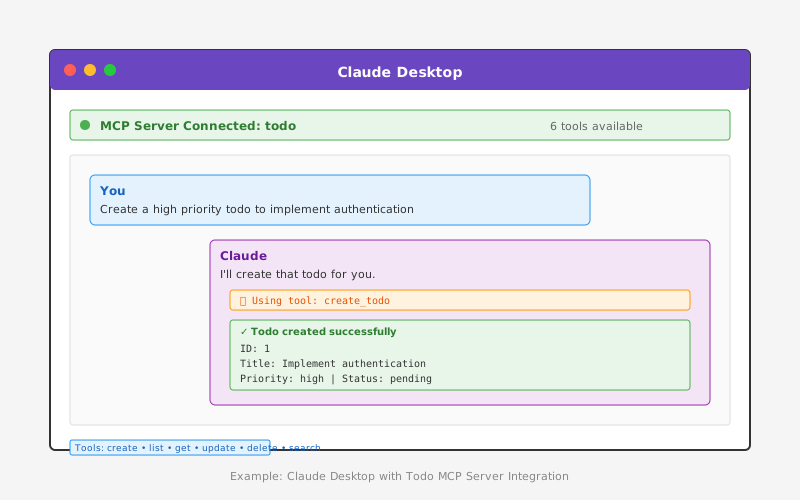
Once connected to Claude Desktop, you can interact with the todo server naturally:
User: “Create a todo to review the MCP documentation with high priority”
Claude: Uses create_todo tool
{
  "title": "Review MCP documentation",
  "description": "Read through the Model Context Protocol documentation",
  "priority": "high",
  "status": "pending"
}
Listing and Filtering Todos
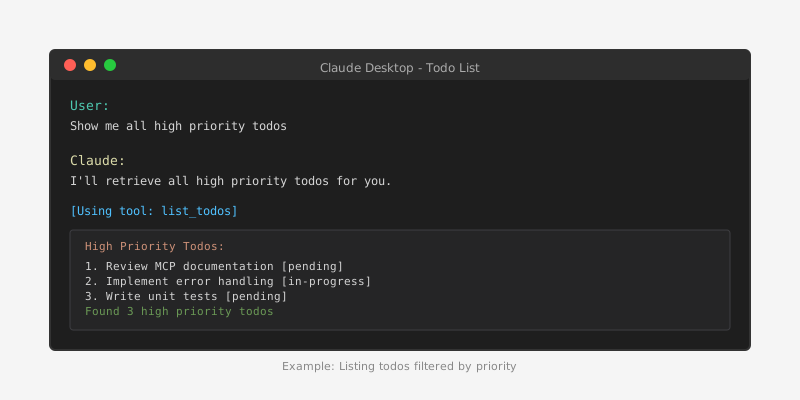
User: “Show me all high priority todos”
Claude: Uses list_todos tool with priority filter
Updating Todo Status
User: “Mark todo #1 as in-progress”
Claude: Uses update_todo tool
{
  "id": 1,
  "status": "in-progress"
}
Searching Todos
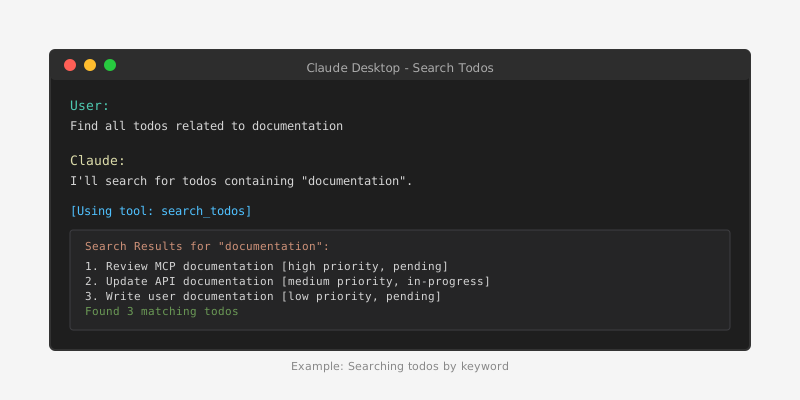
User: “Find all todos related to documentation”
Claude: Uses search_todos tool
Development Workflow
Project Structure
todo-mcp-server/
├── src/
│   └── todo_mcp_server/
│       ├── __init__.py
│       ├── server.py          # MCP server with FastMCP
│       ├── cli.py             # CLI entry point
│       ├── api/
│       │   ├── main.py        # FastAPI application
│       │   └── storage.py     # In-memory storage
│       ├── tools/
│       │   ├── get_todos.py   # Get todos tool
│       │   └── create_todo.py # Create todo tool
│       └── utils/
│           └── http_client.py # HTTP client for API calls
├── docs/
│   ├── README.md              # Main documentation
│   ├── GETTING_STARTED.md     # Quick start guide
│   ├── ARCHITECTURE.md        # Architecture details
│   └── DEVELOPMENT.md         # Development guide
├── tests/                     # Test suite
├── docker-compose.yml         # Docker configuration
├── Dockerfile                 # Container image
├── requirements.txt           # Python dependencies
├── .env.example              # Environment variables template
└── README.md
Testing
Manual API Testing
# Health check
curl http://localhost:8000/health

# List all todos
curl http://localhost:8000/api/todos

# List pending todos only
curl "http://localhost:8000/api/todos?status=pending"

# Search todos
curl "http://localhost:8000/api/todos?search=learn"

# Create a todo
curl -X POST http://localhost:8000/api/todos \
  -H "Content-Type: application/json" \
  -d '{
    "title": "My Todo",
    "description": "Todo description",
    "status": "pending"
  }'
Testing MCP Tools
In Roo Code or Claude Desktop:
Create Todos:
- “Create a todo: ‘Learn Python’”
- “Add a new todo ‘Build MCP server’ with description ‘Follow the guide’”
List Todos:
- “Show me all todos”
- “List all pending todos”
Search Todos:
- “Find todos about learning”
- “Search for todos containing ‘MCP’”
Development Mode
For development with auto-reload:
# Backend API with auto-reload
uvicorn src.todo_mcp_server.api.main:app --reload --port 8000

# MCP Server (restart manually after code changes)
python -m src.todo_mcp_server.cli --log-level DEBUG
Troubleshooting
Port Already in Use
Error: Address already in use
Solution:
# Find process using port 8000
lsof -i :8000

# Kill the process
kill -9 <PID>

# Or use a different port
uvicorn src.todo_mcp_server.api.main:app --reload --port 8001
Module Not Found
Error: ModuleNotFoundError: No module named 'fastapi'
Solution:
# Ensure virtual environment is activated
source venv/bin/activate

# Reinstall dependencies
pip install -r requirements.txt
Connection Refused
Error: Connection refused when MCP server tries to reach API
Solution:
- Ensure Backend API is running on port 8000
- Check API URL in configuration
- Test API directly:
curl http://localhost:8000/health
MCP Server Not Found in Roo Code
Solution:
- Verify MCP server is running:
curl http://localhost:8080/mcp - Check Roo Code settings.json or .roo/mcp.json configuration
- Restart VS Code
- Check Roo Code logs for connection errors
Tools Not Working
Solution:
- Check both servers are running
- Verify logs for errors in both terminals
- Test API directly with curl
- Restart both servers
Key Features and Benefits
1. Persistent Storage
- SQLite database ensures todos persist across sessions
- Automatic database initialization
- Transaction management for data integrity
2. Comprehensive CRUD Operations
- Full create, read, update, delete functionality
- Batch operations support
- Flexible filtering and searching
3. Status and Priority Management
- Three status levels: pending, in-progress, completed
- Three priority levels: low, medium, high
- Easy status transitions
4. Error Handling
- Graceful error handling for all operations
- Informative error messages
- Database connection management
5. MCP Protocol Compliance
- Follows MCP specification
- Proper tool and resource definitions
- JSON-RPC 2.0 communication
6. Extensibility
- Clean architecture for adding new features
- Modular design
- Well-documented codebase
Integration with AI Assistants
The Todo MCP server seamlessly integrates with Claude Desktop, enabling natural language interactions for todo management:
- Natural Language Commands: Users can create, update, and manage todos using conversational language
- Context Awareness: Claude can understand complex requests and break them down into appropriate tool calls
- Intelligent Filtering: Claude can interpret user intent and apply appropriate filters
- Batch Operations: Multiple todos can be managed in a single conversation
Future Enhancements
Potential improvements for the Todo MCP server:
- Due Dates and Reminders: Add temporal features for deadline management
- Tags and Categories: Implement tagging system for better organization
- Subtasks: Support hierarchical todo structures
- Collaboration: Multi-user support with sharing capabilities
- Attachments: Allow file attachments to todos
- Recurring Todos: Support for repeating tasks
- Export/Import: Data portability features
- Analytics: Usage statistics and productivity insights
Lessons Learned
MCP Server Development
- Protocol Understanding: Deep understanding of MCP specification is crucial
- Error Handling: Robust error handling improves user experience significantly
- Database Design: Simple, normalized schema works best for MCP servers
- Tool Design: Tools should be atomic and focused on single responsibilities
- Documentation: Comprehensive documentation is essential for adoption
Best Practices
- Type Safety: Use type hints throughout the codebase
- Testing: Comprehensive test coverage ensures reliability
- Logging: Proper logging aids debugging and monitoring
- Configuration: Environment-based configuration provides flexibility
- Versioning: Semantic versioning helps manage compatibility
Conclusion
The Todo MCP server demonstrates how to build a practical, production-ready MCP server that extends AI assistant capabilities. By following the Model Context Protocol specification and implementing robust database operations, this server provides a solid foundation for task management through AI assistants. The project showcases best practices in MCP server development, including proper error handling, comprehensive testing, and clear documentation.
This implementation can serve as a template for building other MCP servers that connect AI assistants to various data sources and services, enabling more powerful and useful AI-powered workflows.